
Contents · 58 / 58
Use the Portfolio Calendar
Updated 6 November 2026 · 3 min read · 14 Contents
Plain-language meaning
The Portfolio Calendar is a private timeline of dated events for the holdings in one portfolio: results filed, dividend ex-dates, splits and bonuses, buybacks, insider activity, other corporate filings, IPO opening and listing dates, your own thesis review dates and fixed-deposit interest and maturity dates. It also forecasts dividend income from declared dividends and sets up the daily holding digest.
Why it is useful #
It answers what is coming up, or has just happened, for the things you own, without opening each stock separately.
Where it appears and the workflow #
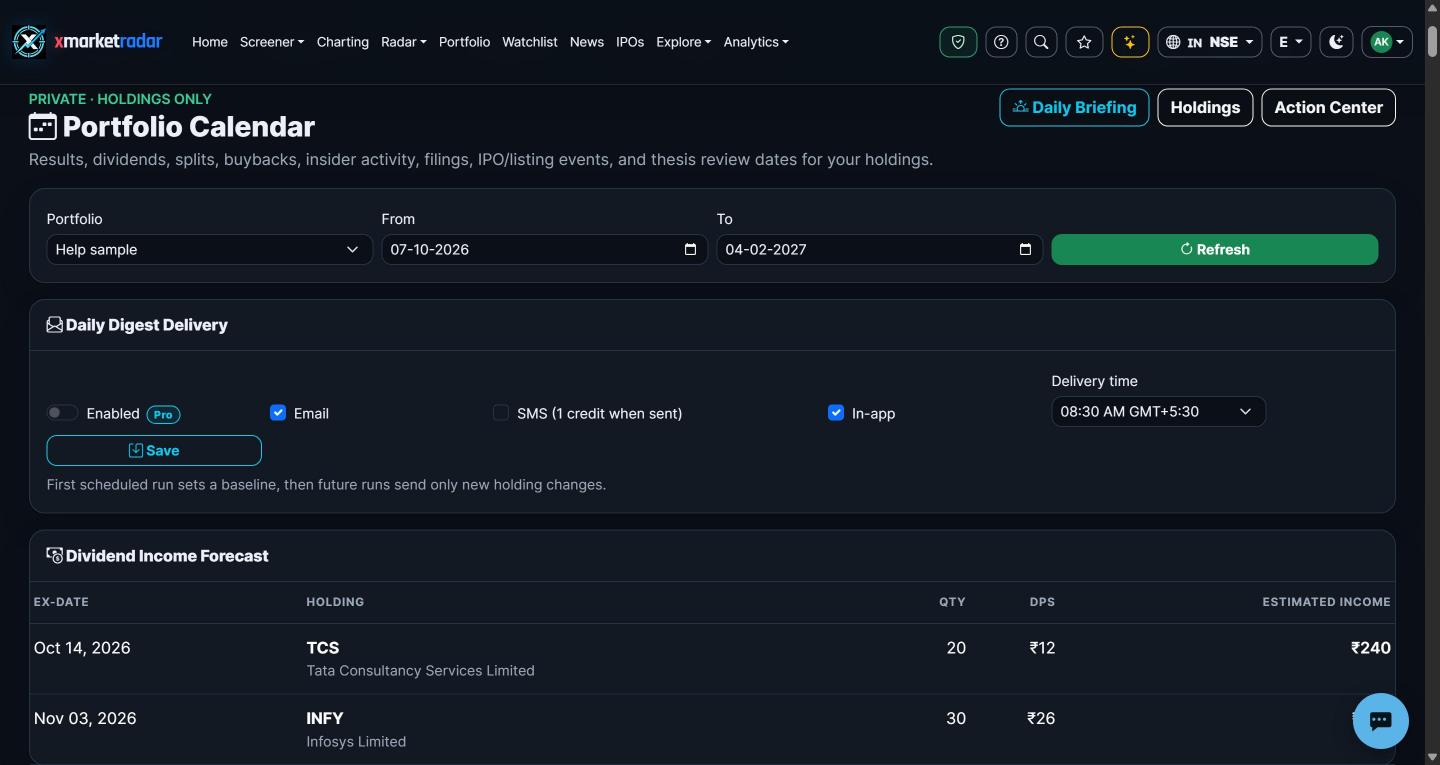
Sign in and open Portfolio, then Calendar (/Portfolio/Calendar). Choose a portfolio and a From and To date, then press Refresh. Events are grouped by date, each with the holding, the event type, a short description, its source and a document link where one exists. Below the timeline, the Dividend Income Forecast lists each declared dividend in the window with quantity, dividend per share and estimated income. The Daily Digest Delivery card turns the digest on, picks Email, SMS (one credit when sent) or In-app, and sets a delivery time. The Daily Briefing button opens the portfolio Daily Briefing page.
Calculation or source #
Events are read from stored filings, results, corporate actions, IPO records and research-thesis review dates for your holdings, plus projections from your own fixed-deposit entries. Estimated dividend income is the quantity held times the declared amount per share. Reading the calendar never changes a deposit or any other record.
Prerequisites, inputs, period and unit #
You need an account and holdings. The calendar is available on every plan; saving digest delivery settings needs Pro, and at least one channel must be on. Without dates the window runs from 30 days ago to 90 days ahead. Amounts are in the listing's currency.
Worked example #
Illustrative only: you hold 200 shares and the company has declared a dividend of INR 5 per share with an ex-date inside the window. The forecast shows estimated income of INR 1,000 on that ex-date.
What high and low mean #
Not a score: the calendar lists dated events in order and does not rank them.
Positive, negative and zero #
Estimated income is never negative. A holding with no declared dividend in the window simply has no forecast row; an undeclared future dividend is never predicted.
Limitations and common mistakes #
The calendar is only as complete as the stored records, so an event the exchange has not yet published will not appear. Filing types are classified from their titles, which can occasionally put an announcement in the wrong group. The first scheduled digest run only records a baseline and sends nothing; later runs report changes against it.
Market-specific differences #
IPO dates are shown for Indian public offers. Dividend and corporate-action records come from exchange announcements for NSE and BSE and from stored corporate-action records elsewhere.
Suggested next steps #
Set the window to the next 60 days, list each dividend ex-date for your holdings, and compare the estimated income with what Track Portfolio Dividend Income shows for the same holdings.
Educational use only #
This guide explains descriptive research evidence. It is not investment advice, a price prediction, a recommendation, a claim of predictive accuracy, or an instruction to buy, sell, rebalance or place an order.