
ഉള്ളടക്കം · 4 / 24
Use the technical charting workspace
പുതുക്കിയത് 4 ഓഗസ്റ്റ് 2026 · 3 മിനിറ്റ് വായന · 14 ഉള്ളടക്കം
ലളിതമായ അർത്ഥം
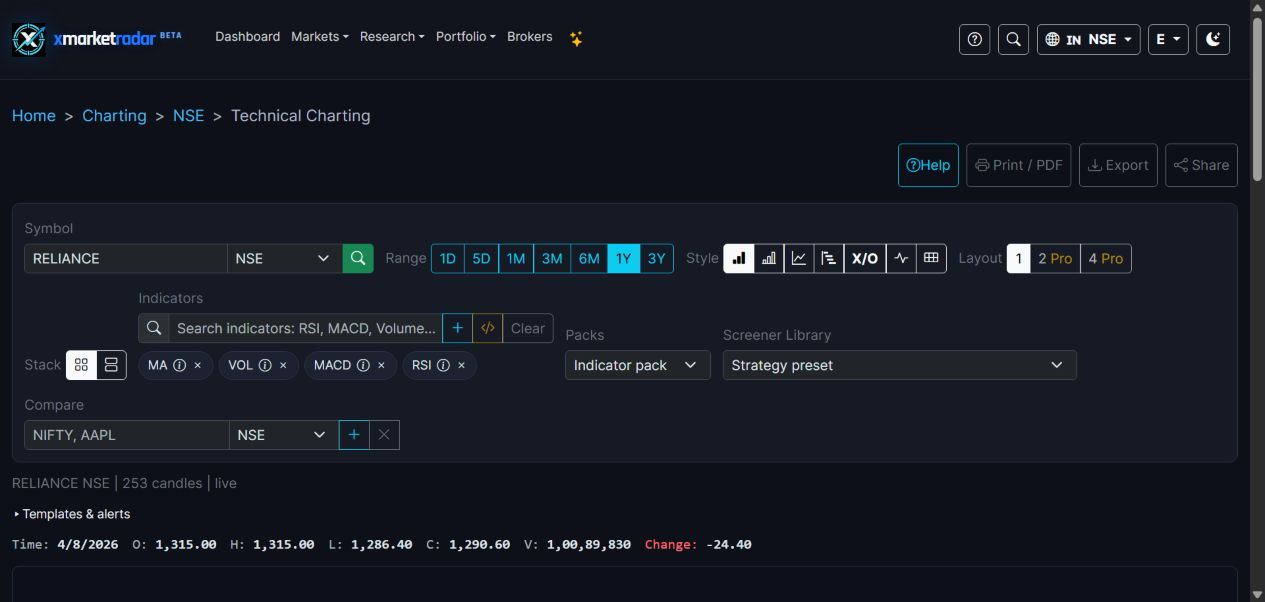
The technical charting workspace plots source-backed history for one exact listing and brings interval, range, chart style, studies, drawings, templates and related research into one place. It is an inspection workspace, not an order ticket.
Learning objectives #
You should be able to open the correct listing, verify source and freshness, configure a reproducible view, add a study without hiding its settings, and hand off an observation to a screener or research workflow.
Core concept #
A reproducible chart state includes exchange and ticker, native quote unit, interval, displayed range, price basis, chart type, every indicator parameter and the evidence timestamp. Drawings add user annotations; they do not become verified fields merely because they are saved.
Method and conventions #
Work from identity to interpretation: listing, source, completed bar, range, interval, style, indicator and finally drawing. Add studies one at a time so the effect of each setting remains visible. Save a template only after the legend matches the intended configuration.
Use it in XMarketRadar #
Open Technical Charting from navigation or Advanced Chart from Market Details. Confirm the exchange badge and symbol. Select range and interval, inspect the latest complete bar, choose style, add a study, open its settings, then use related research links without losing listing context.
Worked example #
For an NSE candle with O=100, H=106, L=98 and C=104, add SMA(5) after at least five valid closes. If only four exist, the average remains unavailable. Switching the interval to 15 minutes recalculates the SMA over five 15-minute bars, not five sessions.
How to interpret it #
The toolbar state describes the current view. A saved EMA 20 template restores an EMA 20 presentation; it does not claim the EMA has predictive value. A drawing above price is a user-marked area, not source-published resistance.
Limitations and common mistakes #
Crowding the chart with correlated indicators obscures rather than increases evidence. Avoid screenshots that crop out identity or timestamps, templates copied between unlike scales, and comparisons where one symbol has delayed or partial data.
Market-specific differences #
The same controls retain different native currencies, tick sizes and session calendars. Unsupported intervals and studies remain unavailable for a venue instead of borrowing another exchange's history.
Key takeaway #
Key takeaway: build charts in a fixed verification order and preserve enough settings that another reader could reproduce the same view.
Practice exercise #
Practice: configure a daily candlestick chart with SMA(20), note every reproducibility field, save a template and reopen it. Verify that no field silently changed.
Educational use only #
This chapter is descriptive education. It is not investment advice, a price prediction, a recommendation, a claim of predictive accuracy, or an instruction to buy, sell, rebalance or place an order.